Table Metadata Guide

Table Metadata

Table metadata gives Guardrail Layer high-level context about what a table represents, how it should be interpreted, and how it should be handled by AI.
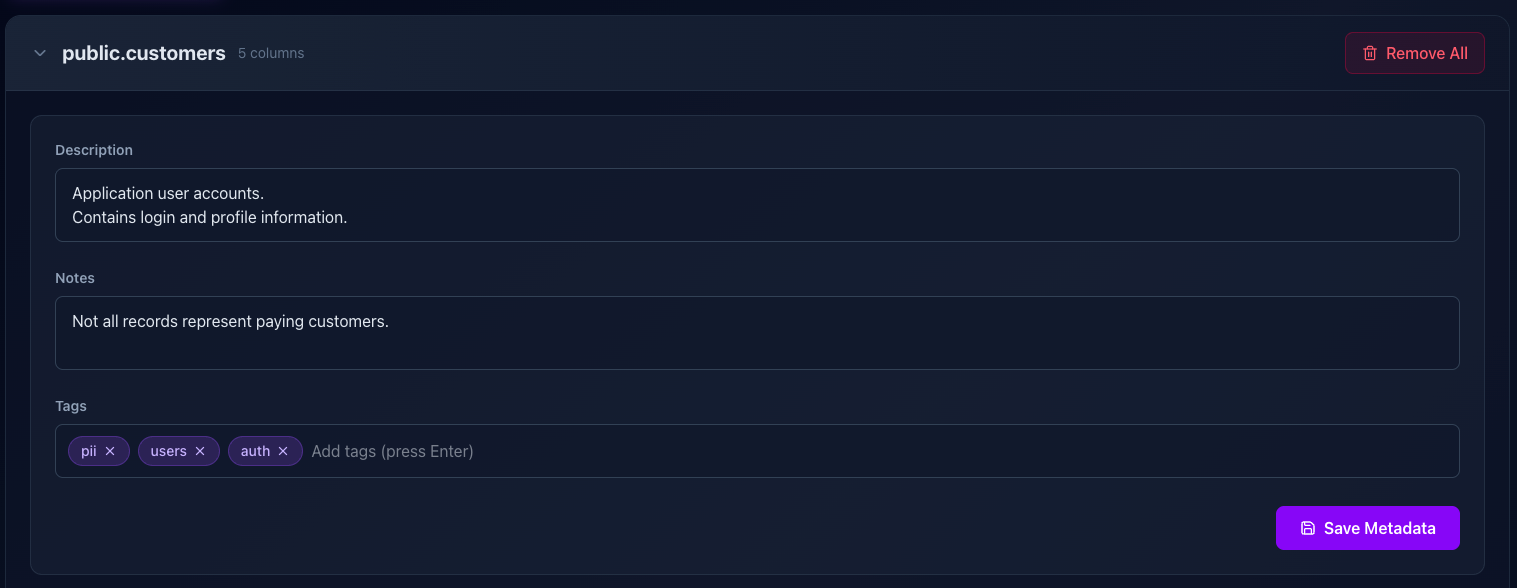
Table metadata editor interface
The metadata editor interface
📋

Description

The Description explains what this table represents at a business or application level.

This is the most important piece of table metadata. It helps the AI understand the table's purpose and prevents incorrect assumptions.

Example
Stores application users and their core account information. Includes personally identifiable data.
💡
One or two clear sentences is usually enough.
📝

Notes

Notes provide additional context that may not belong in the main description.

Use notes for caveats, historical context, data quirks, or anything the AI should keep in mind when reasoning about this table.

Examples
• Records are soft-deleted using the `deleted_at` column • Some rows may belong to legacy accounts • Not all users are active customers
💡
Notes are optional, but extremely helpful for complex or legacy tables.
🏷️

Tags

Tags are short labels that categorize the table and help Guardrail Layer reason about sensitivity, usage, and intent.

Tags should be concise and descriptive. Press Enter to add each tag.

Common tag examples
pii auth billing internal read-only analytics
💡
Tags help guide AI behavior and make future filtering and policy rules easier.

Best Practices

Write descriptions as if explaining the table to a new teammate
Use notes for exceptions, not repetition
Keep tags short and consistent
Treat metadata as part of your security and data model
Scroll to Top